

Your event website is often the first real interaction someone has with your conference, festival, workshop, or corporate gathering.
Before registering, visitors want to quickly understand:
- What the event is about
- When and where it is happening
- Who is speaking
- Which sessions they can attend
- How they can register
- Whether the event is worth their time
A general website builder can publish this information, but organizing speakers, sponsors, sessions, tracks, venues, and schedule changes is a different challenge. The best event website builders make this information easy for organizers to manage and simple for attendees to navigate.
For this comparison, we evaluated each platform based on event-specific features, schedule management, mobile usability, design flexibility, setup time, registration options, custom-domain support, and pricing structure.
The best event website builders of 2026
| Platform | Best for | Pricing | Main Advantage |
| SpinyEvents | Conferences and professional events | Purpose-built event CMS and schedule builder | |
| Wix | Flexible small-business event websites | Broad design freedom and built-in business tools | |
| Squarespace | Visually polished event brands | High-quality templates and branding | |
| EventCreate | Registration-focused event pages | Website, ticketing, and attendee management | |
| RSVPify | Private, corporate, and invitation-based events | Advanced RSVP and guest- management workflows | |
| Whova | Large events needing an all-in- one platform | Website, app, registration, and engagement tools | |
| Webflow | Custom-designed event websites | Advanced visual control and CMS flexibility | |
| WordPress | Extensible, content-heavy event websites | Large plugin and theme ecosystem |
1. SpinyEvents (Best overall event website builder)
Best for: Conferences, summits, workshops, hybrid events, academic events and multi-track programs.
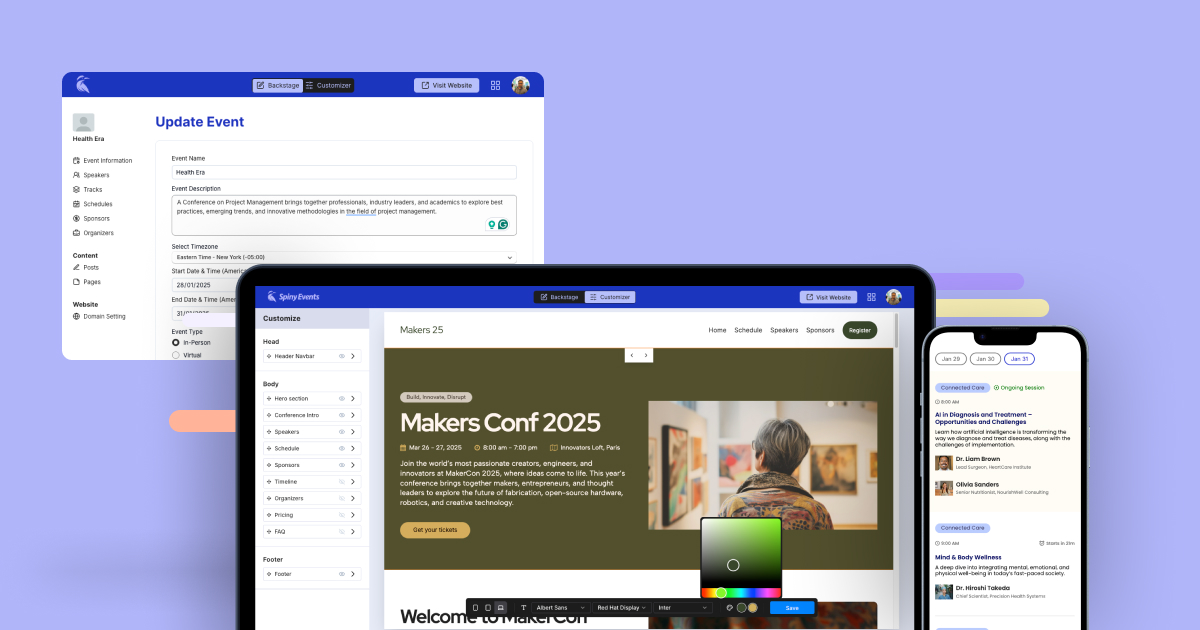
SpinyEvents takes the top position because it is designed specifically for event and conference websites rather than being adapted from a general website builder.
Its event-centric content management system separates important information into structured areas for speakers, sponsors, sessions, schedules, pages and posts. This makes event content easier to manage than placing everything manually into standard website sections.
The schedule builder is particularly useful for conferences. Organizers can create multi-day and multi-track programs through a drag-and-drop interface, connect sessions with speakers and locations, and make last-minute changes without editing individual web pages. Updates are reflected on the website in real time.
SpinyEvents also uses a mobile-first schedule layout. Attendees can navigate sessions on smaller screens, switch between tracks and view schedules in their local time zone, which is helpful for virtual and hybrid events with international audiences.
Key SpinyEvents features
- Drag-and-drop schedule builder
- Multi-day and multi-track schedule layouts
- Speaker profile management
- Sponsor and sponsor-category management
- Session, hall and track organization
- Local-time-zone schedule display
- Mobile-first event pages
- Real-time schedule and content updates
- Prebuilt modular event layouts
- Custom pages and announcement posts
- Custom fonts and brand colors
- Free staging website
- Custom-domain publishing
- Multiple user accounts on the Premium plan
- Cloud hosting, security and server management
SpinyEvents provides a free plan that publishes the website on a SpinyEvents subdomain. Organizers can build and preview the event before paying. The Premium plan costs $129 as a one-time fee per event and includes custom-domain support, multiple user accounts, editable footer information and priority support.
Why SpinyEvents ranks first
General website builders give you design components. SpinyEvents gives you a structure for managing an actual event.
When a speaker changes, a session moves to another room or a new sponsor is confirmed, the organizer can update the relevant record instead of redesigning several pages. This becomes increasingly valuable as the number of speakers, tracks and sessions grows.
SpinyEvents is therefore our strongest overall recommendation for organizers whose website needs to function as the main information hub before, during and after an event.
Potential limitation: Organizations looking primarily for a public event marketplace, advanced ticket discovery or extensive attendee networking may need to connect SpinyEvents with other registration or engagement tools.
2. Wix: Best for flexible, general-purpose event websites
Best for: Small events, recurring community events, classes, event businesses and organizers who want broad design freedom
Wix is one of the most flexible website builders in this comparison. It offers a freeform drag-and-drop editor, AI-assisted website creation and more than 2,000 templates across different industries. Websites can be started for free, although a paid plan is required to connect a custom domain and access more advanced business features.
With Wix Events, organizers can add registrations, ticket sales, invitations, seating plans and attendee tracking. Wix also includes marketing, SEO, ecommerce, CRM and scheduling tools, making it suitable for an event business that needs more than a single event website.
Key Wix features
- Freeform drag-and-drop website editor
- AI website builder
- Event templates
- Ticket sales and RSVP collection
- Seating plans
- Attendee tracking
- Email marketing and CRM tools
- SEO tools
- Custom-domain support on paid plans
- Mobile-view editing
- App marketplace
Wix provides more design freedom than most dedicated event platforms. However, that freedom also means organizers must make more decisions about page structure, navigation and the way schedules or speaker information are presented.
It is a strong choice for smaller events or event companies that want a long-term business website with an events section.
Potential limitation: Complex conference schedules and large speaker directories may require more manual setup than they would on an event-specific CMS.
3. Squarespace: Best for polished event branding
Best for: Creative events, retreats, exhibitions, launches, workshops and experience-based businesses
Squarespace is known for polished templates, strong typography and visually consistent page layouts. It is a good fit when the appearance of the event brand is more important than managing a complicated multi-track agenda.
Squarespace provides website hosting, branded templates, ticket or RSVP options, marketing integrations and tools for event and experience businesses.
Organizers can create calendar pages containing event times, locations and descriptions. However, Squarespace’s standard calendar pages do not provide booking by themselves, and recurring events must be duplicated manually. More advanced scheduling may require Acuity Scheduling or another integration.
Key Squarespace features
- Professionally designed templates
- Visual section-based editor
- Calendar and event pages
- Ticket and RSVP options
- Email marketing integrations
- Ecommerce features
- Blogging and content tools
- Custom domains
- Built-in hosting
- Mobile-responsive layouts
Squarespace works particularly well for events where photography, branding and storytelling drive registrations. A retreat, design festival or product launch can look excellent without requiring a professional web designer.
Potential limitation: It is less suitable for conferences that require frequently updated, multi-day and multi-track schedules.
EventCreate: Best for event registration and ticketing
Best for: Ticketed events, fundraisers, parties, conferences and organizations that want registration built into the website
EventCreate combines an event website builder with registration, ticketing, attendee management and check-in tools. Users can start with a predesigned event theme, add images or videos, change fonts and colors, and create a website without coding or server configuration. Registration forms can include custom questions, multiple ticket types, add-ons and session selections.EventCreate also supports online payments, QR-code tickets, attendee check-in, seating charts, confirmation emails, analytics and integrations with third-party platforms.
Key EventCreate features
- Event-specific website templates
- WYSIWYG website editor
- Custom registration forms
- RSVPs and ticket sales
- Multiple ticket types
- Payment processing
- QR-code tickets and check-in
- Seating charts
- Attendee management
- Email and SMS communication
- Custom domains
- Custom HTML and CSS
- Event analytics
A limited free plan is available, while paid plans expand attendee limits and provide additional branding, communication and management features. Some white-label and custom-domain capabilities may require paid plans or add-ons.
EventCreate is a good option when registration is the center of the event experience. SpinyEvents remains stronger for structured conference content and complex schedule presentation, while EventCreate has the advantage in built-in registration and ticketing workflows.
RSVPify: Best for private and invitation-based events
Best for: Corporate events, galas, nonprofit events, private functions, weddings and invitation-only programs
RSVPify focuses heavily on the guest journey, from receiving an invitation to submitting an RSVP, selecting a ticket or meal, and checking in at the event.
Its website builder supports customizable colors, fonts, backgrounds, images and content blocks. Event pages can include RSVP forms, ticket sales, schedules, maps, FAQs and attendee resources, with information connected to the event dashboard.
RSVPify also provides guest-list management, custom questions, form logic, meal preferences, sub-eventsand targeted event communications.
Key RSVPify features
- Event website templates
- Online invitations
- RSVP and registration forms
- Ticket sales
- Guest-list management
- Custom questions and conditional logic
- Meal and dietary selections
- Invite-only sub-events
- Custom domains
- Mobile-responsive websites
- Branded event communications
- Event check-in tools
RSVPify offers a free option, with paid business plans starting at $24 per month as of July 2026. Higher plans provide increased capacity and more advanced event-management features.
RSVPify is especially useful when organizers already know who they want to invite and need precise control over access, responses and guest information.
Potential limitation: Its registration and guest-management capabilities are more prominent than its tools for presenting large, complex conference agendas.
Whova: Best all-in-one event management platform
Best for: Large conferences, trade shows, association events and organizations needing an attendee app
Whova is more than an event website builder. It combines event websites with registration, ticketing, attendee apps, exhibitor management, sponsor tools, networking and engagement features.
Its website builder includes more than 20 customizable templates. Organizers can host pages through Whova or embed event content into an existing website without coding.
Whova can also generate agenda, speaker and exhibitor pages from information stored in its event-management dashboard. When a schedule is changed in Whova, embedded website information can update from the same source.
Key Whova features
- More than 20 event website templates
- Hosted or embedded event pages
- Registration and ticketing
- Event mobile app
- Personalized attendee agendas
- Speaker and agenda pages
- Exhibitor and sponsor management
- Networking features
- Polls, surveys and attendee engagement
- Announcements and real-time updates
- Check-in and badge tools
Whova’s organizer pricing depends on event size and the selected services, so organizations generally need to request a quote.
Whova is a strong option when an organization wants one vendor for the website, registration, mobile app and attendee engagement.
Potential limitation: It may provide more functionality and complexity than organizers need when their main requirement is simply a professional event website and schedule.
Webflow: Best for advanced custom design
Best for: Design-led conferences, agencies and event teams with web-design experience
Webflow offers much more visual control than a typical template-based event builder. Designers can create custom responsive layouts, animations, content collections and interactions without building the entire website through traditional code.
Its template marketplace includes event and conference designs with CMS collections for speakers, schedules, sessions and ticket pages.
Key Webflow features
- Advanced visual website editor
- Responsive layout controls
- CMS collections
- Event and conference templates
- Custom animations and interactions
- SEO controls
- Custom code support
- Team collaboration
- Custom domains on paid plans
- Large-scale content management
Following its May 2026 pricing update, Webflow’s Basic Site plan starts at $15 per month with annual billing, while the content-focused plan that replaced its former CMS plan starts at $25 per month with annual billing.
Webflow is a good option when a unique visual identity is the top priority and the team has the skills or budget to build the site properly.
Potential limitation: Registration, ticketing and event operations typically require third-party tools, and updating a complex agenda may be less straightforward for non-designers.
WordPress: Best for maximum extensibility
Best for: Content-heavy event websites, recurring event organizations and teams with WordPress experience
WordPress provides the largest range of themes, plugins and customization options in this comparison. An event website can be built with a conference theme and extended using plugins for schedules, calendars, speaker directories, registration, ticketing, payments, memberships and email marketing.
WordPress.com now allows plugin installation on all paid plans and provides access to tens of thousands of plugins.
Plugins such as Event Tickets can add free or paid ticketing, registration and attendee management, while event-calendar plugins can add searchable event listings and recurring schedules.
Key WordPress features
- Large selection of themes
- Extensive plugin ecosystem
Full content-management system - Event calendar plugins
- Registration and ticketing plugins
- Blogging and SEO tools
- Custom code access
- Ecommerce and membership options
- Support for large content libraries
- Hosted and self-hosted options
WordPress.com offers a free plan, while paid plans with plugin installation start from $4 per month with annual billing, or less with a longer commitment. Self-hosted WordPress costs depend on hosting, themes, plugins, security and developer support.
WordPress is extremely flexible, but every additional plugin introduces another component to configure, maintain and troubleshoot.
Potential limitation: Building a reliable event system may require several plugins, ongoing updates and technical maintenance.
How to choose the right event website builder
There is no single platform that is best for every type of event. Before choosing one, consider the way your team will manage the website after it launches.
Choose SpinyEvents when:
- You are building a conference or professional event website.
- Your event has many speakers, sponsors or sessions.
- You need a multi-day or multi-track schedule.
- Nontechnical team members need to make real-time updates.
- You prefer one-time per-event pricing.
- The mobile schedule experience is a priority.
Choose Wix or Squarespace when:
- Your event has a relatively simple schedule.
- Visual design and general website flexibility matter most.
- You also need a permanent website for an event-planning business.
- You are comfortable arranging event information manually.
Choose EventCreate or RSVPify when:
- Registrations, invitations and ticketing are the main requirements.
- You need detailed attendee forms.
- You want guest-management and check-in tools built in.
Choose Whova when:
- You need a complete event-management suite.
- You want an attendee mobile app.
- Networking, exhibitors and attendee engagement are major priorities.
- Your organization is comfortable with quote-based pricing.
Choose Webflow or WordPress when:
- You need extensive design or technical customization.
- You have an experienced designer, developer or agency.
- You are willing to configure integrations and maintain the website.
Final verdict
For most conference organizers, SpinyEvents is the best event website builder of 2026.
It strikes the strongest balance between ease of use and event-specific functionality. Instead of forcing organizers to turn generic website pages into an event-management system, SpinyEvents provides structured tools for schedules, speakers, sponsors, sessions and updates from the beginning.
Wix and Squarespace remain strong choices for attractive, relatively simple websites. EventCreate and RSVPify are better suited to registration-heavy workflows. Whova is ideal for organizations that need a larger event-management ecosystem, while Webflow and WordPress provide greater technical flexibility.
But when the main goal is to quickly launch and manage a professional, mobile-friendly conference website without developers or complicated plugins, SpinyEvents is the most focused choice.
Pricing and product information checked July 17, 2026. Features and prices may change, so confirm current details directly with each provider before purchasing.

Leave a Reply